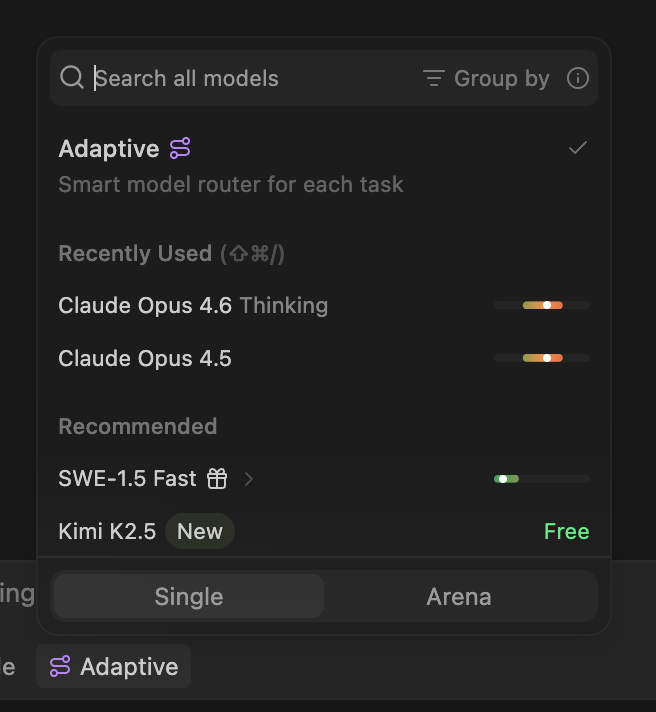
Adaptive is an intelligent model router that automatically selects the best AI model for each task. Instead of manually choosing between dozens of models, Adaptive analyzes your prompt and routes it to the model that will deliver the best result.
How it works
When you select Adaptive in the model picker, Windsurf evaluates each request and dynamically chooses the right underlying model. Simple tasks get routed to fast, efficient models. Complex tasks get routed to more capable ones.
This means you get the right level of intelligence for every prompt without overspending on premium models for routine work. Adaptive helps your usage allowance last longer by avoiding unnecessary use of expensive models.
Selecting Adaptive
To use Adaptive, open the model picker below the Cascade input box and select Adaptive at the top of the list. Once selected, Adaptive will be used for all subsequent messages in the conversation.
You can switch away from Adaptive to a specific model at any time.
Adaptive is the best default for most users.
Pricing
Adaptive pricing depends on your billing plan.
Adaptive draws down your quota at a fixed per-token rate, regardless of which underlying model is selected for a given request.Currently, the Adaptive model consumes quota and overage at an introductory promotional rate (through April 27, 2026).| Token type | Cost per 1M tokens |
|---|
| Input tokens | $0.50 |
| Output tokens | $2.00 |
| Cache read tokens | $0.10 |
For customers on the Cognition platform, Adaptive usage is metered in ACUs (Agent Compute Units). ACU consumption scales with the tokens used and the model selected by the router for each request.
For Windsurf enterprise customers on credit-based billing, Adaptive uses variable-token credit pricing. Each request consumes credits based on the actual tokens used and the model that Adaptive selects for that request according to your credit rate.This means cheaper models cost fewer credits per request, and Adaptive’s routing naturally favors cost-efficient choices — so your credit pool lasts longer compared to always selecting a premium model.
Tips for getting the most out of Adaptive
- Be specific with your prompts. Clear, focused instructions help Adaptive route to the right model and reduce unnecessary token usage.
- Leverage prompt caching. Staying on the same model across turns in a conversation enables caching, which significantly reduces input token costs. Adaptive takes this into account when routing.
- Use Adaptive as your default. For most workflows, Adaptive is the best starting point. Switch to a specific model only when you have a particular reason to — for example, if you need a specific model’s reasoning capabilities for a complex task.