> ## Documentation Index
> Fetch the complete documentation index at: https://docs.windsurf.com/llms.txt
> Use this file to discover all available pages before exploring further.

# Visual Studio のトラブルシューティング

> IntelliCode との競合、Tab キーのキー割り当て、マーケットプレースで表示されない問題など、Visual Studio プラグインの問題のトラブルシューティング方法を説明します。

<Note>
  高度なエージェント型 AI 機能や最先端の機能を最大限に活用するには、ネイティブの Windsurf Editor または JetBrains 向けローカルプラグインのご利用を強くおすすめします。
  Visual Studio プラグインは現在メンテナンスモードとなっています。
</Note>

<div id="supported-versions">
  # サポート対象のバージョン
</div>

Visual Studio 17.5.5 以降

<div id="gathering-extension-logs">
  # 拡張機能のログの収集
</div>

`View > Output` を開き、ドロップダウンで `Codeium` を選択して、ログをコピーします。

<div id="known-ide-issues-and-solutions">
  # 既知のIDEの問題と対処方法
</div>

<div id="dont-see-codeium-in-the-vs-marketplace">
  ## VS Marketplace に Codeium が見つからない場合
</div>

VS のバージョンが 2022 17.5.5 以上であることを確認してください。

<div id="seeing-overlapping-autocomplete-suggestions">
  ## Autocomplete の候補が重なって表示される
</div>

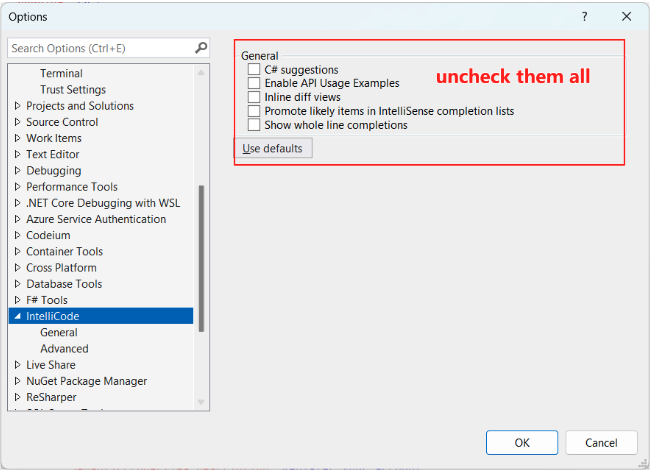
これは、Visual Studio の IntelliCode の候補が Codeium の候補と同時に表示されている場合に発生します。以下の手順で IntelliCode のオプションをすべて無効にしてください。
<Frame>
  <img src="https://mintcdn.com/codeium/d8O4q6w3H2CjrirL/assets/plugins/troubleshooting-visualstudio-disable-intellicode.jpg?fit=max&auto=format&n=d8O4q6w3H2CjrirL&q=85&s=97b198bc53016b25ea553ddd054875d8" width="653" height="473" data-path="assets/plugins/troubleshooting-visualstudio-disable-intellicode.jpg" />
</Frame>

<div id="tab-key-is-not-always-accepting-completions">
  ## Tabキーで常に補完が確定されない
</div>

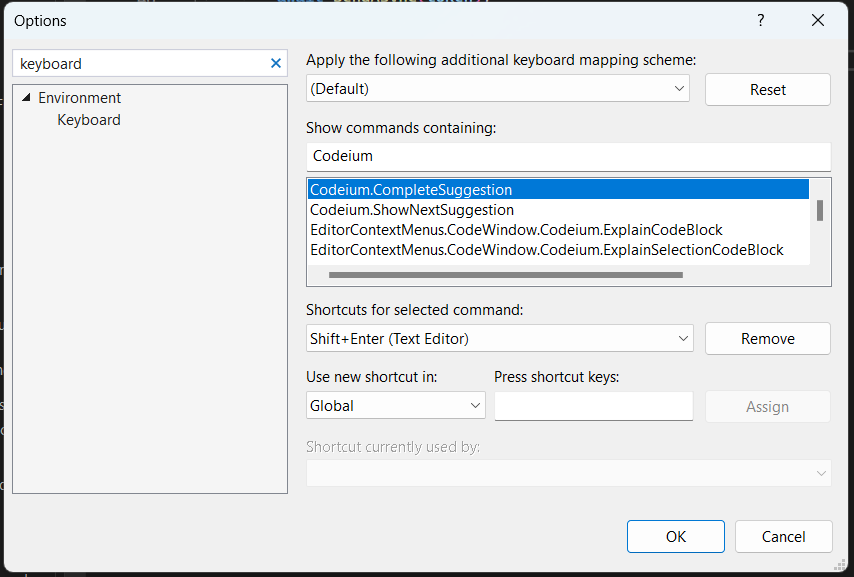
設定で別のキーボードショートカットに割り当て直せます:

<Frame>
  <img src="https://mintcdn.com/codeium/d8O4q6w3H2CjrirL/assets/plugins/troubleshooting-visualstudio-keybindings.jpg?fit=max&auto=format&n=d8O4q6w3H2CjrirL&q=85&s=b8ce35af4c3ab56df5a5a24f8ff1acfb" width="854" height="577" data-path="assets/plugins/troubleshooting-visualstudio-keybindings.jpg" />
</Frame>